I am not going to go too deep into the weeds here but there are some curious decisions being make by the writers and directors of Severance that really pushed me away from the show.
What I am about to say doesn’t take anything away from the actors. They were all great and compelling. It doesn’t take anything away from Ben Stiller being brilliant.
Plus it’s important to note that I have zero experience in writing and have no idea what I’m talking about.
The critiques:
Directors – we do not need the overly dramatic wide angle shots every 5 minutes showcasing the building, parking lot, restaurant, bathroom, etc. We also do not need the long overly dramatic pauses when actors are staring at each other. It’s fucking stupid and not artsy and doesn’t add to the atmospheric dread you think it does when you abuse it. I thought I was watching The Walking Dead. Knock it off. Use it sparingly.
The season was 10 episodes and think the story could have been told in about 3 to 5. The rest was filler and bullshit.
One of the most important characters of Severance is or should I say was, the building. It had this magical feel about it. Like what the hell is going on there. Which turned into… uhhh is this whole thing pointless now?
The opening of Season 2 was terrible with all of the running. The constant walking in the hallways is fucking annoying. Knock it off. It doesn’t add anything. How they addressed the cliff hanger from Season 1 was horrific as well.
Severance is NOT a love story at its core. The reason why Season 1 of Severance was so good is because it focused on the mystery and slowly unraveling little details as to what the heck was going on and who is there. Who are these people? What does this company do? Meanwhile for Season 2, they decided every single plot line needs to revolve around a love story. Incredibly frustrating and lazy writing in my opinion. When I saw this happening I immediately thought about Lost. Lost was about the Island and the mystery. Lost soon became a love story and just brushed all of the mystic and mystery about the Island and the main plot under the rug.
More about lazy writing. Its so easy to add new plot lines. In need of a new plot line? Just add a new room. Add an additional turn in the endless white hallway. Need a new level to the building? Yeah, easy again. Add a new hallway but make it dark. Damn that shit is scary. Did you see how dark it was? I’ll call it the naughty hallway. Here atLumon we used to keep tabs on our employees but not anymore! Explore my friends! Note how they discover new plot lines. This reminds me when Lost just kept adding new stuff on the Island even after they were there for a year. Ohhh, we never thought to walk to that side of the beach. Why didn’t we do that to begin with? Oh right the scary monster thing in the forest. But that doesn’t seem to be a problem anymore. Whoopsies, plot continuality error. Look at that, new people live here. How convenient.
More about the lazy writing. Okay, so Mark’s wife was taken during a car accident. How the fuck did that happen? What year is this? 1954? No cameras exist to see what happened? I’m sorry but that is bullshit lazy writing and incredibly stupid.
More about lazy writing. Why the fuck is an outie’s wife visiting an innie at work. That makes no sense. I know why, let’s add ANOTHER love story about a supporting character. That’ll be really nice and compelling…
More about lazy writing. We want to keep Burt in the story. We want to keep Irving. But how? I know. Lets just focus on their love story. If Burt makes people disappear, then I want to know more about that.
More about the lazy writing. Do people at Lumon even work anymore? The main characters spent like 25 minutes working in 10 episodes. Management went from monitoring your every move to … sure there is plenty of time for you guys to fuck.
Just to be clear here. Nearly every single major worker on the Lumon project got caught up in a love story. Love stories became the main plot of most aspects of the show. You should be focusing on the mystery and the building, the technology, and explore characters like Milchick
When Helly R found out Mark fucked her outtie and he failed to realize it wasn’t her she is like…. Oh. I’m gonna go for a walk to get over this. Those white hallways are magical for getting over stuff in record time. Then we can fuck and now we are in love. Sorry it took me so long to get over that. ahahahaaaaaaa. Let me guess. She is pregnant for Season 3?
So yeah, I’m not watching season 3. You couldn’t even give me 2 solid seasons before the wheels fell off? Its not even 24 episodes per season like in the old days. Its fucking 10.
I think its really fun to try to predict the future. Mostly because its hard.
There are a lot of wide ranging ideas on AI and potential outcomes. I listened to this Adam Conover Youtube video about AI and some of the comments surprised me. Surprised to hear such binary thinking. Is AI the Devil or a God? Will it Destroy Humanity or Save Us? Will it wipe out all white collar jobs? Can we Trust OpenAI with this P O W E R?!
Sheesh. Slow down. How about none of the above? Sorry but we will live somewhere in the middle.
Booooooring.
Common Misconceptions
The idea that AI or OpenAI is limited to a silly Chat Bot that can output funny pictures and proofread your email or LinkedIn post is a gross misrepresentation of the technology. The idea that OpenAI is simply another Google is also wrong. If you think you can try to pigeonhole how or where AI can be used then you are also thinking about it wrong.
Understand this major point. AI is rapidly advancing. More than any technology ever before. And the idea that we should ask where the limit is or predict what it is capable of are the wrong questions. You cannot because for the first time the sky is literally the limit. No hyperbole. That’s where we are at.
We have been scammed by tech promises before. I realize that. AI is not the blockchain. It’s not shitty NFTs. Its not promises made that have no chance of coming true. This is NOT crypto. This is not DogeCoin.
What about the Cash Burn by OpenAI?
What about it? Wait, let me guess. They don’t justify their valuation either?
I often hear OpenAI is burning cash and that they can’t possible turn a profit. ChatGPT isn’t enough. They’d need to sell XXX millions of memberships.
Again. You are MISSING the point. Do you honestly think AI and OpenAI stops at a chatbot or their API?
AI is progressing so rapidly that they have no choice but to burn cash in a race to the finish line. Is the finish line AGI? ChatGPT 10.0? I don’t know but they cannot afford to sit around and casually spend money to wait and find out.
Think of OpenAI more like Amazon. They will keep raising money and burning money until the machine is built and fully online and then incrementally improve. Then finally worry about profitability.
OpenAI is also not the only game in town. Google. Facebook. All of these players and more will be competing over the next decade plus.
Jony Ive Enters the Chat
In Adam’s podcast they basically scoff at the idea Jony Ive and OpenAI are building a next generation product that puts AI at the core rather than a more traditional device like a Laptop or Phone.
Its a brilliant bet. That is most likely the future. Will it be glasses? Maybe. Maybe it will send you notifications and/or interact with your TV, laptop, smartphone when it needs to. Its sort of like Siri except useful. It’s definitely not the Humane AI Pin or Rabbit R1 either. Those devices are the equivalent of alt coins. AKA shitcoins.
I absolutely see a future where we all have an AI companion cube. Call it Jarvis. Much like having a cell phone today that lives across devices.
So you want to bet against the guy who is one of the inventors of ChatGPT. And the guy who created some of the most iconic devices ever at Apple and is a legend in design. This is like the Avengers teaming up. Kobe and Shaq. Scottie and Michael. Curry and KD. (Sorry Draymond and Klay, you should not be left out but it didn’t fit what I was going for here)
I would never bet against these guys to release a transformative device. And I certainly would not laugh at the notion of them trying.
Google Assistant is a part of around 1 billion devices. Amazon Alex is around 500+ million devices.
Will AI Take Jobs? Is it Hype?
Look around you my friend. It already has.
I am way more productive today than I have ever been and I didn’t get here by hiring developers. I got here by using AI. I don’t waste time in an endless search loop on StackOverflow. I don’t waste time looking up classes for Bootstrap and examples of potential layouts. I just use AI and get straight to the point. Need a complicated regex? lolz. Need to build a Chrome extension over the weekend? hah – how about in a day.
I can offer my users PERSONALIZED fantasy advice 24/7 tailor made to their league settings and fantasy rosters. Across the four major sports. The days of asking Matthew Berry on Twitter and hoping he replies are behind us. Need an in-depth breakdown for a complex trade in your fantasy baseball league? No problem. It understands the complex dynamics at play and if its fair. And this is just the start.
Those developers used to have a job. They could be hired as a contractor before. Now they aren’t needed at all or the same work can be done with 20% less people.
And that is just at a small fantasy sports startup. Apply that across dozens of industries. There are less jobs now. It’s a fact. Will new jobs pop up to replace them? Historically yes. Realistically? Who knows.
The Future is AI
I can imagine a future where LLMs are created and assigned to specific areas across the science, medicine, etc. Could they solve climate change? Yeah. Could they come up with more effective treatments for Cancer that result in groundbreaking clinical trials? Yes again. In fact, I’d bet on it. Could they help solve nuclear fusion problems and get us there quicker than within the “next 20 years?”. Yes again.
What company will build these sophisticated models geared towards specific areas of research? Who will own the rights? Is it happening already? How much do you think can be made selling these custom models?
Let’s say you create a model more advanced than what we have today that understands all scientific papers about the cosmos, quantum mechanics, physics and more. It would not shock me if that AI model came up with a theory to explain Dark Energy. Or even Dark Matter. Help us find life on another planet or galaxy? I can see an AI Model being a co-author on the paper published in Nature. Then we as humans come up with a more refined approach and figure out ways to test it. With. You guessed it. The help of AI.
Why are these notions so farfetched? AI has no ceiling. That is the whole fucking point.
And for a bit of good news….even if AI did take over the world. You wouldn’t know about it until it wanted you to know. So at least there’s that.
I haven’t blogged in a long time for a variety of reasons but the current scene on Twitter in regards to SEO is completely off the rails. To the point of cringe, so I decided to fire up the blog-o-matic one more time.
There is a ton of misinformation, and I want to take a second to provide my insights on it because I completely disagree with the conspiracy theory as to why Reddit has risen in visibility.
Let me preface this with I am NOT and SEO expert. It’s not what I concentrate on day after day. I concentrate on running a business and SEO is one of the many hats I wear.
Speaking of running a business. Do you play fantasy sports? Do you like winning? Well, check out FantasySP and the Fantasy Assistant to help manage your teams an stay on top of breaking player news. (super smooth promo – nice)
Follow the Experts, Avoid the Influencers
We live in a very fortunate place in time where SEO experts freely and publicly display their thoughts and insights for all of us to learn from. Lily Ray, Glenn Gabe, Marie Haynes just to name a few. You can find other reputable figures in the industry based on reading through their timelines.
This is a good way to avoid “SEO influencers” and stick to the professionals.
A general rule of thumb. If the person on Twitter hides their URLs, then they are probably not a great source of SEO advice. If the person on Twitter advertises newsletters and courses behind a paywall then they are probably not a great source of SEO advice.
The point of SEO is not not create niche blogs and rank for niche content based on keywords in that niche.
In my opinion, the point of SEO to help businesses and creators put their best foot forward with a better understanding of how search engines work.
If you currently run a niche blog, then try to create a company and brand with it. Soon you won’t look at things through the lense of an SEO, but through the lense of a business owner and entrepreneur.
Wrong way of thinking…. My SERPs have dropped lately but my content is good and well researched. Maybe I just need to become a travel agent to rank better. Surely that is a good ranking signal.
Right way of thinking…. I want to turn my niche blog into a business. It makes sense to take the next step and become a travel agent or partner with travel agencies to convert visitors into leads.
I am not an SEO professional but I like to pretend
I have been building companies since before social media was a thing. SEO was never my main focus. To be honest, I learn whatever I have to to ensure my business succeeds and SEO is one of many hats.
For example, did you know that originally all apps created for Twitter had follow links in each tweet?
Well, I did. And I used that knowledge to build my own app to generate follow links from the Twitter domain a long time ago. That meant learning the API, building the app, and to start tweeting.
The Reddit Conspiracy Theory
Essentially, the quick summary of the conspiracy theory is that Google partnered with Reddit prior to their IPO and inked a deal for $60 million for API access. Now with data access, they wanted to push Reddit visibility to further increase the value of their data and train their models.
Traffic has started to increase since Summer of 2023 and has continued to rise as this current March Core update is still ongoing. Not by a little, but by A LOT. An unprecedented amount.
These are the biggest sites on Google in the US, in terms of SEO visibility (via @sistrix)
Every one of the top 10 sites has seen visibility decline this week, with the exception of https://t.co/BHi9S8v22a
Some SEO influencers (not those listed above) across Twitter then got out their pitchforks and took to the streets of the internet to cry foul over unfair Google business practices. Surely, even Lily Ray is on it. Danny Sullivan, how could you do this?! Bro, weak sauce.
Case closed, no? We got em.
How We Got Here, the Data Arms Race
First, some facts. Google has a market cap of 1.99T. Reddit has a market cap of 7.41B. Reddit has never been a profitable company since 2005.
Keep in mind, Reddit does not pay for content. They do not pay for moderation. All of this is free and they STILL have not been able to turn a profit in their company’s history. Ouch.
There was a movement to close access to data since the rise of ChatGPT. Large Language Models (LLMs) are only as good as the data they are trained on. At this point in time, LLMs have gobbled up most of the publically available data. So what’s next?
Owners such as Elon Musk started to limit API access to Twitter in July of 2023. It also limited access to public URLs to avoid scraping data in large quantities. He listed a variety of reasons, like cost, but the real reason was most likely to prevent companies from using their data to train models for free without proper compensation.
The arms race on data begins. ChatGPT is king. Google and others need to scramble to catch up.
Meanwhile, Reddit is preparing for an IPO, so obviously they cannot continue to allow apps to dominate using their API for little to no cost.
By finally becoming a public company they decided to kill all third party apps and limit access to their APIs. Moderators revolted but in the end there was little they could do.
Spez (aka Steve Huffman) basically said we have the power and these apps have to go. Their revolt won’t last forever. All our data are belong to us. Boy was he right, but still very much an asshole.
As a public company Reddit needs to maximize revenue by all means necessary which includes 1) Selling data to companies who want access for LLMs, 2) Forcing users to use their official apps so they can make more money off advertisements and keep tabs on user metrics.
Ah yes, sweet sweet control.
But what About Google
As I mentioned earlier, Google was completely blown out of the water by ChatGPT. OpenAI was poised to dominate the next revolution of technological growth. And make no mistake about it, AI will indeed dominate the next decade in innovation.
“We’ve had a longstanding relationship with Reddit for many years, and today we’re sharing a number of ways that we’re deepening our partnership across the company“
“Google now has access to Reddit’s Data API, which delivers real-time, structured, unique content from their large and dynamic platform. With the Reddit Data API, Google will now have efficient and structured access to fresher information, as well as enhanced signals that will help us better understand Reddit content and display, train on, and otherwise use it in the most accurate and relevant ways. This expanded partnership does not change Google’s use of publicly available, crawlable content for indexing, training, or display in Google products.”
O rly. Liar.
But Surely Google Can’t Be Trusted
Reddit data was as valuable two years ago and it is today. Increased visibility in search engine results DOES NOT make their data more valuable. Sorry, it just doesn’t. There is no correlation.
If you were to pay for access to all of the research papers on astrophysics, the visibility is low but the value is sky high for a LLM.
Plus, Google does not own a stake in Reddit the company. They do not care how the company performs as a publicly traded company. Google does not run specific ads on their platform to generate additional revenue for Google.
If this conspiracy theory held any water, they would have also announced an advertising partnership to funnel that money BACK into Google’s hands.
If you really wanted to be a conspiracy theorist, Google could intentionally tank the stock by decreasing visibility and forcing Reddit to sell to them. Now that’s evil and fits the narrative.
All to save what, $60 million dollars? Google does not care about $60 million dollars. Google has a 2 trillion market cap. Even that is a stupid idea.
Furthermore, this is what you know publicly. You do not know what other deals Google has for data. They could have deals with multiple companies to train data on, and Reddit is just one of many.
If I were Google, I’d want access to various types of data to train models on, and one of many is User Generated Content.
You have no idea what deals Google has in place or what data deals they are working on. Plus, you are most likely using Chrome to read this.
The biggest power grab in the history of the internet. They literally invented a web browser to maintain their control over market share in search. Yet, somehow, the big news is this data deal with Reddit?
Google inks a deal with Apple to be the default search engine for billions of dollars, but this data deal with Reddit is the big problem.
Move on. There is nothing to see here but a phase in Google’s history about adapting their algorithms to a new age in content creation. Reddit has way too much visibility. I think it’s a mistake and things need to be tweaked but that is a topic for another day. Forbes and other companies ranking for literally anything is also a huge gaping hole in fairness and accuracy.
If there is interest I will dive a bit into how I see the current SERPs and recent core updates. However, I am fairly certain there are qualified SEO professionals to take on that topic.
Recently Intercom announced their new pricing scheme which resulted in a 2X price increase for using the same product for me. I made a comment on Twitter about this price increase and the folks at Intercom were nice enough to reply.
They are the industry leader and have to do what is best for them. However, as a small business owner I had no choice but to move away from their product to minimize my overhead.
According to the Crisp website I wouldn’t lose any core functionality whatsoever and instead would GAIN value.
TL;DR Instead of paying ~$500 per month using Intercom with limited functionality, I switched to Crisp and gained access to Bots, Help Desk, and a Status Page for just $95 per month. By switching to Crisp exclusively, they save me at least $5,000-6,000 per year.
But before I get to the good stuff, let’s take a look at the stuff that isn’t so great.
Intercom is better at Design
The most obvious thing you will miss when moving to Crisp from Intercom is the difference in the interface. Intercom has such great attention to detail and has such a slick interface. It feels like a modern app and is the reason why I refer to Intercom as the industry leader in this space. (I don’t know if that is true or not, but that is my perception)
Every aspect of Intercom’s interface is better, including the floating help box where the customer interacts and the backend side of things. Everything from replying to tickets to setting up automated campaigns just feels better on Intercom.
Ticket Replies Should be Better
Let’s take an in depth look at ticket replies and how their interface falls short.
Crisp Ticket Reply
Why is the reply window box so small? The box should be much bigger and the whole screen itself is a bit more basic compared to Intercom. The method in which you close tickets is also a bit wonky. There is a color coated bar on the top of each ticket that you have to click on to close it.
Crisp will NOT autosave your responses as you type. This one will be missed because sometimes during a ticket we might get distracted or accidently close the tab.
There is no point and click interface for Saved Replies, so instead the only option is to type in the shortcut interface of “!texthere”. (Make sure your support team knows this ahead of time)
When creating new Message Shortcuts (aka Saved Replies), you have to go to a different area completely, which is under Settings. I can’t just quickly type one up without leaving this area and save it. In addition to that, it uses a markup language rather than a point and click interface to create links, images, and formatting. This isn’t necessarily a bad thing, but it means that the average Joe might be a bit confused at first glance.
When you attempt to include an image in a Crisp ticket, it will automatically send the image in it’s own response. There is no option to add the image inline with your text response. Needless to say, it’s a bit cumbersome.
I often find myself accidently pressing the enter key twice while replying to a ticket in an attempt to start a new paragraph, but instead it sends my half-completed response to the customer. Whoops.
Limited Segments Functionality
Crisp does not have the ability to create segments like Intercom. On intercom, it was basically a mini database that I could interact with and create my own segments in a few clicks.
For example, I cannot easily save a new segment consisting of all of my users who are paying members that like football and have logged in the past week. That data can still be sent via the API and saved for a user, but you can’t manipulate it like on Intercom.
Instead it is much more basic and just lists your Contacts for a specific segment. If I wanted to duplicate that functionality, I’d have to add a custom segment via the API and assign this user a segment using my own code.
Automated Campaigns are Different
When I say different I mean this in a bad way. In Intercom I can add an automated campaign based on any user data entry I add via the API.
In Crisp, I can only set up Automated Campaigns based on Events that push via the API. So for example, I can’t set up an automated campaign for users who first logged in today or first appeared as a new trial member segment.
Instead I have to create a “New User” event and push it to the API. This requires additional work that I didn’t have to do before. I don’t like how this works and wish I can set up automated campaigns based on user data rather than Events, but it’s not the end of the world.
The way in which Intercom organizes campaigns is also better. I can create a campaign and call it “Onboarding User” and once I click that it’ll show the series of emails I send off.
In Crisp, it’s not like that and just lists all of the emails I have set up, and I don’t know what event they are attached to unless I click on it. Messy.
It’s Not All Bad, Seriously
I realize this entire article thus far is me nitpicking features that Crisp has in comparison to Intercom. After everything I have listed above, you would think that I hate Crisp. The truth is that I would still without a doubt migrate to Crisp.
In the end, the biggest functionality that you lose is the Segment interface, aside from that, everything else is there.
Bots Bots Bots
I had never used the Bots feature in Intercom simply because it was too expensive so I have nothing to compare it to. However, once I migrated to Crisp, I eventually set up my first bot after getting the core functionality working and was super excited to finally have this feature live on FantasySP.
It took a bit of time to understand the flow but they do have examples to go by and a good help section.
This should cut down on the same type of support tickets and make both the end user happy and the person answering support tickets happy.
Simpler Pricing
Switching to Crisp means no more dealing with additional packages. I don’t have to add the Help Desk package or the Bot package. I don’t have to worry about how many contacts I have added over at Crisp. I don’t have to worry about how many active contacts will affect the price during my busy season versus my low season.
Crisp has 2 plans to choose from and offers up a dedicated IP option. That’s it. Simple. Elegant. Straightforward. Honest. No complex (shady?) bullshit to deal with. No more guessing how much September will cost compared to May.
I am getting peace of mind at Crisp. Companies like Crisp who offer up simple pricing like this should be rewarded for doing the right thing.
I am on the cusp of a pricing rant and want to talk about email companies absurd pricing model, but I am going to reel myself back in.
Dedicated Email IP
So far I haven’t seen the need to add a Dedicated Email IP. All of the emails sent to my test email addresses arrived without any warnings and did land in the inbox.
Crisp recently launched a new analytics section that shows Campaign deliverability rates among other things. Based on what I see there, I am not overly concerned about deliverability rates as of writing this. However, I do wish that they included more in depth reporting for email bounces. Are they bounces because of invalid email addresses or because of another issue like AOL sucks? Crisp doesn’t tell you.
The price of the dedicated email address appears to have increased from $35 to $55 a month? I’m not 100% sure, but I remember seeing a much cheaper price just a few weeks ago.
Helpdesk Rocks
Another cool perk of Crisp is that they include the Helpdesk in their unlimited package for $95 a month. This is another feature I wish I could have used at Intercom, but again, the price was way too much to justify it.
So instead I was using GrooveHQ to handle the FAQ and help section, which was around $240 per year. Now I can finally ditch that additional expense and keep everything inside one interface to make it easier for my customers to get the help they need.
I am happy to report that the Crisp Helpdesk is possibly my favorite feature. It looks great. Writing and organizing articles is a snap. Not to mention, Crisp automatically includes a working certificate as soon as you create it.
Yet again, Crisp proving why it has so much value. They also include a Status Page so you can easily inform your users of an outage. I personally don’t need to use this feature but I created a basic status page just for the email alerts.
The Crisp Support Team Rocks
When I first started researching which product to switch to I had a lot of questions. I contacted customer support multiple times and they were always extremely helpful. I’m not talking just generic questions that sales could handle, but real in depth questions a developer would ask about the API, etc.
Angelique was especially awesome when it came to answering my questions.
Wrap Up
Again, I want to reiterate that Crisp offers amazing value for a great product. A lot of the things I picked on in this article should not deter you from making the switch. I just wanted to let you know that there are some key differences.
In fact, you would be stupid not to switch in order to save thousands of dollars.
I understand a lot of companies are lazy and won’t make the switch and just swallow the additional cost like it’s no big deal. Heck, I didn’t want to migrate away either but money talks.
So if you take away anything from this post, hopefully you walk away knowing you’ll be in good hands over at Crisp.
I have been working on the FantasySP redesign for over a year before it officially launched on May 20th 2018. The redesign was something I first thought of doing over 3 years ago, but I kept putting it off due to working on other features and the sheer size of the project.
I knew it could not be delayed any longer after the announcement by Google for their mobile-first index. I thought I could have it up before this all went into effect, but then the news broke that their mobile-first index was going live in March.
Prior to the redesign, I had a mobile site and a desktop site. Each had its own codebase, both front-end and backend. Yes, you heard right. Not only that, but the mobile site didn’t have ALL of the features of the desktop site and some were stripped down versions of the desktop site.
The mobile site was so old, that it used tables because that is what you still used when mobile sites were gaining popularity for maximum compatibility.
The initial codebase for the mobile site was pre Bootstrap and pre front-end frameworks. It was back when Digg was the shit, so I decided to use their design for mobile FantasySP. It was back when responsive layouts didn’t exist yet and a separate mobile site was the only real option.
I also knew the task at hand was monumental and I knew I needed help for two reasons. First, I knew a professional designer would create something better than I could. Second, I knew this would speed up the process.
I contacted Ryan Scherf, and we narrowed down a framework (Bootstrap), a new color scheme, and started to tackle a few pages. Ryan and I worked back and forth from about January of 2017 to May of 2017.
To call this simply a ‘redesign’ is an injustice. It’s way more than just a facelift since every piece of code is being touched behind the scenes. This is basically a relaunch of FantasySP, and I’ll get into more about that in a bit.
Learning to Ride Again
The thing about web development is that you are always evolving and constantly learning new technology. Switching to Bootstrap v4 meant ditching floats and moving to flexbox.
Flexbox in itself is a huge change and a huge learning curve, and I still need to use a cheat sheet but I am getting better with it every day. Basically, I’ll be using flex instead of using floats for layout positioning,
Not only that, but Bootstrap itself has its own laws and ways of doing things that I had to learn. (Yes, it’s true, I never used Bootstrap before this) Needless to say, having a designer come up with the Bootstrap theme was monumental into getting started off on the right foot.
On top of Flexbox and Bootstrap I needed to learn the modern way to develop on the front-end which meant adding Gulp and Bower into the mix. (Though do not use Bower if you are starting out now, use Yarn instead.)
Ryan pointed me in the right direction so I could get started and get everything working.
Keep in mind that I didn’t even start the real work yet. This is the work before the work. I had to learn 3 brand new things that were pretty damn challenging before things even got off the ground.
My goal was to get a variety of pages designed to get a base foundation to work off of, and I would spend the time to fill in the gaps and create pages based off of those core pages.
Slowly but surely I was getting the hang of the new workflow, and I could start taking Ryan’s designs and create new pages and tweak the layouts he had already given me.
Starting Over
The redesign meant that I was starting over. Everything was going to be re-written from the ground up. If I am doing this redesign I am going to do it justice.
The new FantasySP will be fast and customizable. It will be lean (as best as I could). And it was going to be as future proof as I could possibly make it.
This meant all of my javascript functions had to be looked at and most had to be recoded. This meant basic things like autocomplete, pop-up boxes, front-end data checks, table sorting all had to be researched. Some of it Bootstrap would handle, but many of them had to be included as extra javascript libraries.
From now on I would have one file for CSS and one file for JS and that was it.
It also meant I had to redesign the billing page and implement the newest version of Stripe on both the frontend and the backend. I was using code from 2011 and it was starting to give me problems on occasion.
I wasn’t going to try and reinvent the wheel. Honestly, I don’t have time to relearn EVERYTHING. I’m not switching to MEAN and ditching my stack but I will modernize it. (If you are looking for benchmarks, you’ll find them at the end of this article, but I’m not spoiling it here.)
And yes, I would still be using jQuery. I’d still be using nginx. I’d still be using PHP 7.x…. commonly referred to as the LEMP stack. You may not like the stack, and hate PHP but that’s because your an idiot. 🙂
Speaking of PHP, all of my code had to be looked at and either re-written or tweaked in order to fit into a unified codebase for a responsive layout.
Like I said, this task was daunting.
The Actual Design
Now that some of the geeky stuff is out of the way, let’s actually talk about the design. There are a few things I knew I wanted the new design to have:
A new color because red reminds users of ESPN
A better top navigation
A dedicated section for user navigation
awesome player popups
reimagined fantasy tools
obviously be responsive
Once we figured out the colors and top navigation, the real work on the design could start. My wife was the one to narrow down that the color orange would work for the site, and Ryan picked the perfect shade to work with.
The day I got really excited about this redesign was when work began on the reimagined start/sit tool. One of the first mockups looked like this.
Start/Sit Take One
A good start, but I wanted the top section to pop colorwise. It needed something to make it stick out that I thought was missing.
Based off that feedback, he completely nailed the revamped design and is something I would have never come up with on my own.
Start/Sit Take 2
One last example I’ll show are the early mockups of the Player Page and Player Popups.
I needed a much better way to organize the chaos I had going on with the player pages, and I am pretty sure the first thing I got back was almost exactly what I used in my final design.
I didn’t provide much insight into what I was looking for other than please organize it all, and allow for a bunch of different boxes to the right side that I could work with.
player page
As soon as I saw it, I could not wait until this thing went live. It looked light years better than what was already on the site
The first player popup design that we started with was great right off the bat, but much like the start/sit tool, I wanted a bit more color to the header.
Player Pop-up (1)
Which then turned into this:
Player Popup 2
The live popup as of today looks like this:
Live Popup
Once Ryan’s design job was done, it was time to get a good sampling of live pages to turn into real HTML/CSS. I had no idea how to formulate a bootstrap theme, so I really needed to see how it was supposed to be done.
I would take what he gave me, which was the core styling of FantasySP and a few pages and then come up with designs for the rest of them. I think one of the first designs I converted into CSS/HTML was the player popup and boy oh boy did that take me a long time.
This was when I had to really buckle down and learn the ins and outs of Bootstrap and flex positioning. Needless to say, it was not fun and I felt lost for a few weeks. I still kinda get lost with flex positioning because it is just so different.
Once the rest of the designs were turned into CSS I finally had enough material to create the beta subdomain and start turning these HTML/CSS pages into actual working pages with live data.
It turns out, that day happened to be May 17th 2017. As you can see, all I had was a hello world.
At this point I would be starting over in terms of all of the backend logic for PHP and would start from scratch. In some cases, I would take my old PHP code and convert it to work with the new layouts. It was a major milestone, but my work was far from over.
From this point, it was still another year before I officially launched the new FantasySP.
In June of 2017, I finally had enough of the beta site up and running to open it up for users to start trying. From that point on, I tackled each page and tool and kept grinding away.
Redesigning the Fantasy Assistant, Trade Analyzer, Draft Genius, billing, etc were extremely time consuming and very challenging but totally worth it once I was finished.
The Fantasy Assistant itself probably took me at least a month on its own because of the sheer size of it, plus for the first time it had to work on mobile.
Time for Stats
Like I mentioned earlier, the redesign was supposed to be much faster than the original site. Paying members will get an experience even faster because no advertisements are shown.
The numbers do not lie.
Front End Load Times
Front end load times are measured based on what percentage of load times are considered Satisfied, Tolerating, and Frustrating. This data is taken from New Relic.
ORIGINAL: Satisfied: 53%, Tolerating: 40%, and Frustrating: 7%
NEW DESIGN: Satisfied: 80%, Tolerating: 18%, Frustrating: 3%
According to Google Analytics, average page load times went from a range of 5 – 15 seconds, all the way down to a much more narrow range of 4.5 to 6 seconds.
Wrap-Up
I feel like this post is getting too long so I am going to end it here. Hopefully this post helped you visualize the long journey that I had to navigate. Of course, I am nowhere near done in terms of optimizations.
I’d love to go into optimization techniques I’ve used on this redesign but most of them are widely known these days for frontend development… it’s mostly a matter of just implementing them.
I still need to upgrade to PHP 7.3 and upgrade nginx and enable the pagespeed module but there is plenty of time to get to those over the next few weeks. I will make a new blog post detailing those changes and how it affected performance and the people behind the scenes that helped me.
For now though, I am extremely happy with the speed, the design, and the response from my users. Do yourself a favor and check out the brand new FantasySP yourself.
After roughly a year and a half since I started the redesign, it went live without any downtime and just a few minor bugs that needed to be fixed.
Now that this redesign is finished, I can implement features much faster since I am working with one unified codebase. Thanks for reading!
Before you get to reading this post, it’s important to consider that these are just ideas in order to make the process of voting for President better regardless of which candidate you support.
The truth is that people vote for the wrong reasons all the time, and I want to go through some of those reasons and how it could be fixed.
My ultimate goal is to force every American to vote logically for the candidate that will help them and the country.
Picking a side
Politics is one of the few topics where almost everyone has an opinion on but don’t necessarily know what the fuck they are talking about. This is problem because they have to vote people in office.
So how do people end up becoming a Republican or Democrat?
Well, perhaps the best way to answer that question is to lead into other questions that are related.
Why do people end up rooting for a specific sports team? Why do people end up with a specific religion?
All of those things tend to be heavily influenced based on location and/or the influence of their parents/siblings. But it’s more complicated than that.
Back in 2005 a gallup poll was conducted to see how many teens stay true to their parents political beliefs said, “71% say their social and political ideology is about the same as mom and dad’s”.
However, a new study concluded that “over half of all children in the U.S. either misperceive or reject their parents’ political party affiliations”.
The study authors also discovered that the more politics were discussed in the home, the likelihood that a child would correctly identify their parents’ party affiliations increased. It did not, however, increase the likelihood that they will adopt said affiliations.
Plenty of us have seen kids grow up to reflect their parent’s political beliefs, but that won’t always happen.
My personal belief is that politics are influenced by parents and only strong-minded individuals will learn for themselves as to what party to support. Similar to religion. Though some kids just want to rage against the machine, and I can understand that as well.
However, there is no question that where a person grows up and lives has a direct impact on their political affiliation. Simply look at the results on the map after each presidential election.
If you break that down by counties, it almost perfectly pinpoints where major cities are vs rural areas.
Why does rural America vote Republican? That’s a different topic all together that you can read about. However, research has found that “Trump does particularly well among older, white and non-college-educated Americans.”
What’s also interesting is that people who are “conservative prefer places where the population is more spread-out, while liberals prefer denser neighborhoods.” This according to a study done by Pew Research.
Politics is like Religion or Sports
I grew to learn on my own that Politics should be put in a different basket. It’s not about who you support or who you root for. You should not be picking a team at age 12 and just sticking with them through thick and thin like it’s the Cubs. It’s about learning what’s the truth is and which party has the country’s best interest and your own best interest.
I realize that few people have the same type of thinking that I do when it comes to politics. In fact, almost no one thinks that way. Many people tend to look at politics as rooting for their sports team or religion.
Not everyone is into sports, so politics is essentially their sports team and they root hard for it. Blind love, blind devotion. You know how every mom thinks their son or daughter is the best, most wonderful, smartest child alive? It’s like that.
And yet we wonder how people can be so blindly loyal to a political party and ignore the facts. Please.
If you live in Colorado you will be a Broncos fan. What type of news would you like to hear about? How their quarterback situation is in peril or that they have the best defense in the league? I wonder.
Studies have shown that people like to hear about news and facts that enforce their beliefs. A Broncos fan wants to hear news about how awesome their defense is and a Democrat wants to hear about how awesome the Democrats are. It’s human nature.
But it also poses a problem. People tend to ignore facts if they do not support their beliefs. If you start a debate based on facts, and the truth becomes inconvenient, then the person will completely ignore the facts and say they have “a right to their opinion”. Well of course.
Scientific American has new research entitled “The psychological advantage of unfalsifiability: The appeal of untestable religious and political ideologies”
What I am trying to get at is that people are biased and do not give a shit about facts or logic.
The whole issue in regards to Fake News exists because people WANT to read about that news. They do not care to take a moment to consider if it’s real or not. To blame Facebook for allowing fake news to spread is like blaming Google for allowing fake newsletters to circulate through email. Your crazy grandpa will still send the crazy newsletters. He doesn’t care that it’s fake.
Sure, Facebook can help label stories as fake, but will people even care?
A survey conducted by Ipsos Public Affairs said Americans are fooled 75% of the time by Fake News.
Ensuring people vote in their own best interest
It’s pretty obvious that most people are voting based on some type of bias and are not voting based on logic or the truth. So how do we make sure that people vote for what’s in their best interest?
The answer is simple. Remove the ability to vote for a candidate. Yes, I know it sounds crazy, but hear me out.
If we remove the ability to vote directly for Hilary Clinton or Donald Trump then we must replace that with a new, more logical, method to vote.
mmmm, logic. sweet sweet logic.
The new way to vote for President should actually be a series of questions. First, start with some basic stuff like:
How much money do you make?
Where do you live?
Size of household?
How old are you?
What is your sex?
If the voting is entirely electronic, then most of these questions should already be known after a person enters their social security number or scans their drivers license. However, these questions could be asked again.
The second batch of questions is entirely politically based:
Do you support stricter gun control?
Do you support minimum wage hikes?
Do you support a border wall for Mexico?
What is your stance on nuclear power?
Are you in favor of renewable energy?
Do you support LGBT rights?
Are you for or against abortion?
Are you concerned about job growth?
Are you for paid paternity and maternity leave?
Is protecting the earth important to you?
Are women’s right’s important to you?
Do you think healthcare should provide free contraception?
Do you think pre-existing conditions should effect health coverage?
How do you view our country’s defense spending? A) Just Right B) Too much C) Not enough
This is just a small sample size of potential questions. The questions will also need to be approved by both political parties to ensure they are fair and not pushing a person’s vote in one direction.
In order to eliminate someone’s bias, follow up questions will need to be asked based on their answers. For example, a typical republican voter will always vote against stricter gun control. They automatically equate gun control with something bad.
However, if you ask that person if they think semi-automatic weapons should be banned they may end up saying “yes”. This would be leaning democratic.
If you ask that person if a person is on the “no fly list”, should they be allowed to purchase a gun? If they say “no”, then this would also be leaning democratic.
By answering these questions, the machine will calculate a political ranking for the person and vote on behalf of the person’s best interest automatically.
Viola, that person just voted based on logic only.
Surely a republican might be pissed off if they voted democratic or vice versa, but you know what the best part is? A print out, or email will be sent to the person breaking down every question they answered and provide the true facts and which party the answer leans towards.
Not only do you vote via this method, but you are also educated on the issues.
Skipping the questions
Obviously it is everyone’s right in the country to vote for president, so no matter what people need to be offered a way to vote.
But most people will want to skip the series of questions and already know who they want to vote for. Naturally, right?
No problem. They can do so as long as they agree to give up their tax break for the next 4 years in order to do so. (Younger adults won’t care about this tax break, but that’s okay because we want young adults to vote.)
Their needs to be some type of financial penalty in order to vote directly for the candidate of their choice. When it’s gonna cost the voter money to take this route, then most people will take the series of questions rather than give up money.
Better yet, show them how much money the will potentially give up based on their current salary.
Wrap Up
You will always see people voting against their own best interests unless you change the way people vote for president. And changing the way people vote for president will never ever happen.
Wait, what? Yes, I know my idea will never happen. But I figured I’d put it out there anyways.
If this new type of voting went into affect, you’d quickly see the Republican party move towards the middle of the political spectrum and less extreme. You’d see more of an emphasis on facts and less about spreading the bullshit on “bullshit mountain”.
In fact, ALL voting for government office should be done in this manner. And it should be a holiday for a day or even a week if that’s what it takes. Voting is one of the most important things a person can do and it’s so easily overlooked.
So where does this leave us? In a world where facts don’t matter, logic is useless, and voters don’t understand what they are doing.
I became a new customer of SendGrid a few months ago. The biggest draw to them was the features they offered for an affordable price. Though, chances are you know all about their features. What you really want to know is how to fix Yahoo deliverability issues.
You should know that I had Yahoo deliverability issues from the day I signed up and got a dedicated IP. The date I signed up and started to send mail through SendGrid was October 24th 2016.
The day Yahoo emails actually started being delivered? December 1st 2016. That is a total of 38 days before I could even reach my Yahoo users. Yes, it was an absolute nightmare, and I was close to jumping ship.
Before we get to the solution (spoiler, there isn’t one), let’s first make sure that you have everything set up properly for best sending practices.
Whitelabel Email
Each email provider has a slightly different way of authenticating emails. SendGrid has authentication steps listed under Settings -> Whitelabels.
Before you send a single email, make sure you complete each section:
Whitelabeled Domains
Whitelabeled Email Links
Whitelabeled IPs
I am not going to walk you through this because if you are at the post, chances are you probably already did all this. If you want to avoid having emails bounce or being deferred then make sure these 3 steps have been completed.
Make sure your Sender IP is Clean
I am fairly certain that SendGrid provides clean mailing IPs, but you should always double check and make sure your dedicated IP is not listed on any black sender lists.
Head over to mxtoolbox or SenderScore to check your IP against known blacklists.
Also check the health of your IP sender score, which can also be checked at SenderScore.
Let’s assume you have a clean IP and a 99% sender score. Yahoo should love you at this point right? Well, you’d be wrong. Even so, it’s important you check these to make sure it’s not causing problems.
E-Mail Best Practices
Make sure you use best practices when sending email to give you the best chance that an email will reach an inbox.
Again, I’m not going to go through this here because I am assuming you know what you are doing.
What I will emphasis here is to make sure you use List-Unsubscribe headers in EVERY single email you send. Sendgrid talks a bit about why they are important.
You want your users to be able easily click to opt-out of email rather than click the SPAM button. There is an easy way to add unsubscribe links to your footer on every single email.
You may also want to create Unsubscribe Groups for the different type of emails you send. You might have different newsletter types, or transactional emails, Re-Enagement Emails, etc. Each type can have its own subscription group that a user can opt in or out of.
It’s an awesome feature and the main reason why I am using SendGrid. Delve deeper into SendGrids official libraries for more information on how to use it within your apps.
If you guys make a comment and want to see my PHP code then I’d be happy to paste it here, but I don’t want to get too off topic.
Now, if you’ve already done all that and are still having problems then continue on.
Reach Out to SendGrid
Reach out to SendGrid’s support team to make sure that they know about your issue. Their support team is generally pretty helpful in the few times I contacted them.
However, in regards to deliverability you will likely get a generic reply about what a deferred email is and best practices.
Chances are, their support team can’t help you. You see, SendGrid is supposed to already warm up and IP for you. I mean, they invested money in a Warm-UP IP video, so you’d think this thing is pretty top notch huh?
Well, I am sure I went through the warm up IP process but it didn’t help me with Yahoo email being delivered.
The WorkAround
If you want to ensure Yahoo users will get your mail then look for @yahoo.com emails and send one through SendGrid and send another through your web server’s mail or your previous email provider.
When you see Yahoo mail starting to be delivered then disable the 2nd option.
I didn’t use this method for all emails, just the extremely critical ones like password resets, etc. Once I noticed that email was being delivered I switched it back through SendGrid.
The Solution
Chances are that every single email provider you send to will accept your mail without a problem. If there are some that are blocking you, then reach out to them through the proper channels and they will remove the block. I had to do this for att.net emails.
Take a close look at your Activity log to see which emails are being blocked or deferred.
The solution to Yahoo is to just wait. Yep. That’s it. Just wait. You can’t do shit about it. As long as you are following best practices then it’s just a matter of waiting for Yahoo to accept the new IP.
I sent a Yahoo Bulk email request form and never heard back from it. It’s possible it helped, so you may want to fill it out as well.
In the meantime, I kept sending emails through SendGrid and they kept getting deferred. Occasionally there would be a random day or two that a few emails would actually arrive at inboxes but then it would go back to being deferred.
Keep an eye out for those days! It’s a good sign.
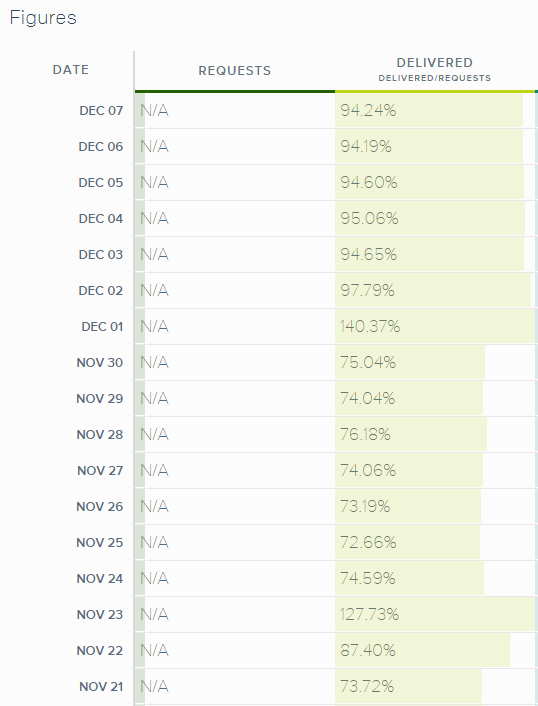
Notice those days where Delivered is above 100%? That’s because the differed emails started to go through and more were being delivered than sent until things normalized.
My delivery rate is now around 94% which is great and probably what I had before I switched to SendGrid. The remaining 6% of emails not being delivered are people who have opted out or bounced.
If you have a similar story or have a better solution then let me know.
An article hit hackernews today with the title “PHP Sucks“. The reasons for it sucking are as follows:
There is a lot of old code out there that’s shitty
There is a bad stigma for PHP developers
You may get paid less as a PHP developer compared to other languages (Proof?)
I’m not sure if you can get paid less to be a PHP developer, but it’s important to be a full stack engineer and learn as much as possible about the stack you are on.
One of my favorite quotes from the article
Sometimes people are more straightforward and will just respond with “Oh, I’m sorry about that”. Recently I talked to a CEO who more carefully said “Ah, that’s pretty old school right?”. Developers who more-so live in the Java-dominant corporate bubble will likely silently dismiss me as a incompetent programmer.
I find this to be pretty funny. If you care about what other people think about the language you choose then you’re worried about the wrong stuff.
If you told me that I should switch away from the LAMP stack because it’s slow, then I am all for that. Speed would be my #1 reason to move away from PHP.
You want to swap out Apache for nginx? Sure thing. Why? Because nginx is much faster and uses less RAM. (Though it’s not a drop in replacement in most instances)
The problem, or lackthereof, is that PHP is among the fastest languages out there. If you switch from PHP to Rails then you would be bummed to find out how slow Rails is compared to PHP7. Cool, hip programming language, but much slower. Hmm, decisions decisions.
Do you want a fast app or do you want to worry about what other people think?
If you care more about what others think than making sure your application runs as fast as possible, then I feel sorry for you. If I cared what people say I’d be working for some 9 to 5 job as just-another-developer being underappreciated and underpaid and listening to a CEO who almost knew what the fuck he was talking about.
I run the LAMP stack for FantasySP and give zero fucks. When I finally migrate to PHP7, then I’ll hopefully have around double the speed. My apps average response time is 120ms. I reckon I can get that to around 60-90 ms with PHP7. What’s not to like?
Your database is one of the most important aspects of your server software stack. Call me old fashion, but I still rely on MySQL as my database of choice and don’t see myself changing any time soon. Over the past 7 years of running FantasySP, I’ve learned quite a bit about maintaining MySQL and making sure my server is running as smooth as possible.
Keeping MySQL Up to Date
The most obvious way to ensure MySQL performs its best is to make sure that your server software is up to date. Updating to the latest minor release of MySQL should be one of the safer routes to go in. These fix bugs, security, and minor performance improvements. You should update to the minor release versions on a pretty regular basis.
A major release version upgrade is much more involved. If you see that MySQL is nearing its end of life, then it’s time you start planning. I have done 2 major upgrades from 5.1 -> 5.5, and then from 5.5 -> 5.6. Chances are you will encounter problems with query performance with a major release update. MySQL Query Cache Optimizer can behave very differently depending on what major release version you are using. Queries that ran fine on 5.4 will run poorly on 5.5.
When Upgrading MySQL to a New Major Release
In order to safely upgrade to a newer MySQL major release version you should first make sure that you are running something like NewRelic to monitor your query performance. Get a good baseline for typical application performance so you can compare it to when you upgrade.
To be safe, you could be running the old & new version of MySQL on your development box if you can. This way you can plug in two queries with the same dataset on two different version of MySQL and get an idea of performance beforehand. I usually don’t do this and just deal with the shitstorm that ensues, but some of you may want to play it safe.
Usually when a query performs badly it is because the newer version of MySQL decided to ignore the indices that were previously created for a table. I have seen this happen quite a few times. If you are running a vanilla WordPress installation then you probably won’t have to deal with this, but custom apps will probably encounter this problem. You’ll be able to see bad query performance when you use EXPLAIN on your troublesome query. Full table scans lead to terrible performance, so don’t be alarmed if this happens.
To fix this you may have to develop a better index to speed up performance, or you can force MySQL to use a specific index with the following query:
SELECT * FROM table_name USE INDEX (names) WHERE last = ‘something’
Another reason an updated major release of MySQL runs poorly could be that your configuration file is outdated. Sometimes they may change the names of something or remove it and MySQL will start with Query Cache disabled or default settings. Make sure you save a backup of your original my.conf file.
Useful Scripts to See Performance
Using NewRelic is great, but there are two popular database scripts to help with diagnosing performance issues. You have probably heard of them, but I just want to double check you have them. One is mysqltuner.pl and the other is tuning-primer.sh.
They will tell you how your cache is performing, if you have full table scans, how many prunes are happening per day, if your query cache is big enough, etc. All very useful stuff to determine performance. I am assuming you know how to deal with fixing those issues, but if you don’t you can Google them or buy a MySQL book or two to learn more.
Software to Manage & Run MySQL Queries
My development environment of choice is Windows. With that in mind, I like to run a local MySQL application to make my life easier to diagnose queries, create tables, indexes, synchronize data, etc.
My software of choice is SQLyog and can’t say enough about how awesome it is. If you deal with custom MySQL queries a lot, then I strongly suggest using an application similar to this to make your life easier.
Pruning Old Data
MySQL databases tend to be like old attics where you just keep saving shit even if you don’t actually need it. If you have data from 2011 that you don’t need then make sure you get rid of it.
If you properly prune your database on an annual basis then you can extend the life of your current hardware stack, save money, and have much better performance. A smaller database means less space for MyISAM indexes, which means you need less memory for caching. (Assuming you use MyISAM)
So the big question is, how do you prune old rows in a table with 20 GIG worth of data without using DELETE queries? We all know that DELETE queries are way too expensive to run at this scale. The solution? Create a new temporary table with the same indices and table names. Then copy the data you need from the old table to the new table. Once your done, DROP the original table and rename your new table to the old table.
I learned this trick from Sean at the Clicky blog and trimmed the size of my database in half.
I noticed a sudden trend in my GA starting on March 20th. I thought it was a fluke, until I noticed that 3 days later the change in numbers still persists.
All signs point to Google Analytics blocking an IP range and/or bots from being tracked.
Starting on March 20th, the number of pageviews and unique visits had a sudden drop. This also coincided with an increase of pages per visit (shown below).
Pages Per Visit
I have compared my pageview data to Clicky and AdSense and their data shows no change. This leads me to only one conclusion: GA is blocking some type of traffic and has not announced this yet.